Slack link preview image generator
Make the image Slack unfurls under your link: a 1200x630 card for launch posts, docs, and internal announcements.
Free, no signup. The preview you see is the PNG you download.
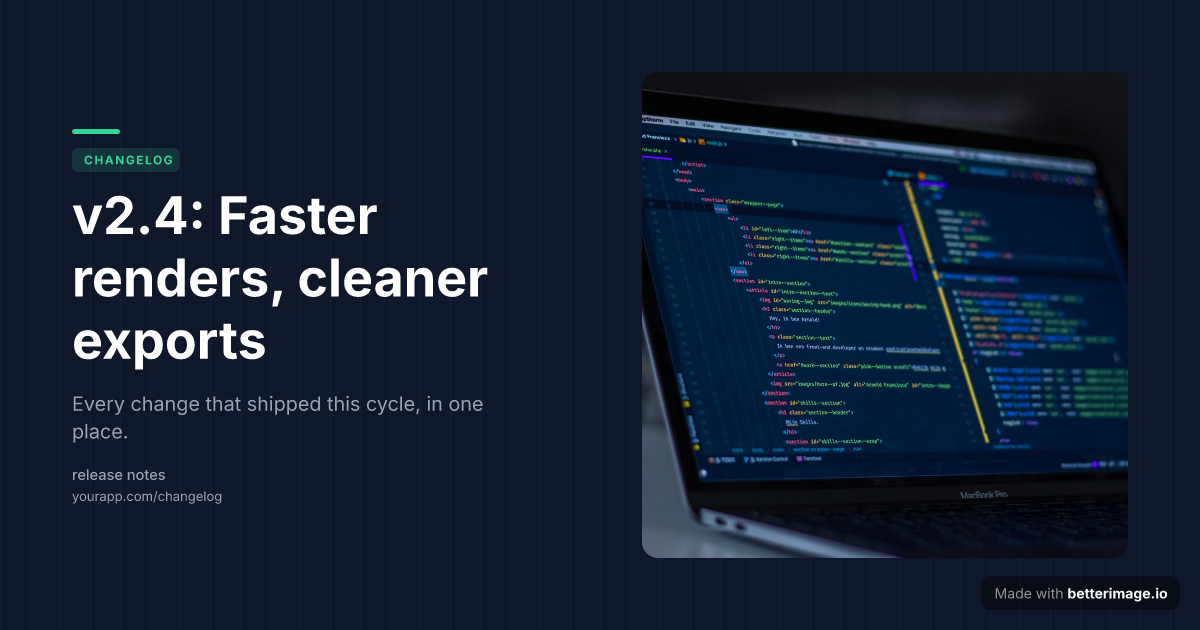
Release notes
Version headline in monospace with a code screenshot. For changelogs and release posts.

Engineering post-mortem
Cover photo behind the title with a dark overlay so the headline stays readable.

Manifesto or changelog
One bold line and a tagline. Accent dot or bar to match your brand.
Click any example to open it in the editor and make it yours.
Paste a link in Slack and the app expands it into an unfurl: title, description, and an image pulled from the page's Open Graph tags. For a team announcement, a changelog entry, or a doc you want people to actually open, the unfurl is the first thing the channel sees.
A deliberate 1200x630 card makes that unfurl look intentional instead of accidental. Design it here in the browser: headline, colors, a screenshot or logo, download the PNG, host it with the page, and Slack picks it up from the og:image tag.
How it works
1
Pick a template
Start from an example above or from a blank template in the editor.
2
Make it yours
Type your text, set colors, fonts, and layout, upload a photo or logo. The preview updates as you type.
3
Download the PNG
Free with a small corner mark, or $4.99 once for the clean file. No subscription.
How Slack decides what to unfurl
Slack reads standard Open Graph tags (og:title, og:description, og:image) from the linked page; no Slack-specific markup exists. A landscape image around 1200x630 renders as the large preview under the text rather than the small side thumbnail, which is what you want for announcements.
The image URL must be publicly reachable over HTTPS. Links behind a login wall unfurl without an image, because Slack's fetcher cannot see it.
<meta property="og:title" content="v2.4 release notes" />
<meta property="og:description" content="Everything that shipped this cycle." />
<meta property="og:image" content="https://yoursite.com/og/v24.png" />
Frequently asked questions
What image size works best for Slack unfurls?
A landscape Open Graph image around 1200x630 renders as the large preview below the link text. That is the size every image here is rendered at.
Why doesn't my link unfurl in Slack?
The page may lack Open Graph tags, block Slack's fetcher, or sit behind a login. Slack also lets workspace members collapse or disable unfurls per link or per app.
Can I use this for internal tools?
Yes, as long as the og:image URL itself is publicly reachable. The page can require login; the image file cannot, or the unfurl shows without a picture.
Is anything posted to my Slack?
No. This tool only makes the PNG. Slack picks it up from your page's meta tags like any other link.
Is it free?
Yes. The editor needs no signup, and the free download carries a small corner mark that a one-time $4.99 payment removes. No subscription.
More generators
Make yours now
The editor is free and runs in the browser, no signup. The free download carries a small "Made with betterimage.io" mark; a one-time $4.99 payment removes it. No subscription.
Open the editor